33 AI tools + 8 free browser tools · One credit balance · 10 free credits to start

Every asset your game
needs, from a sentence.

Concept art, sprite sheets, sound effects, full soundtracks and short video clips — generate every asset your game needs from a single sentence, then wire them into a reusable pipeline with AnnoMotion Forge. One workspace, one shared credit balance. No lock-in, no separate logins. Make the asset, download it, and drop it into Unity, Godot or Unreal before the next coffee lands.

Try free — no signup Sign up · 10 credits Continue with Google
Image AI-generated sunset over a misty desert canyon
Type a sentence → game-ready art
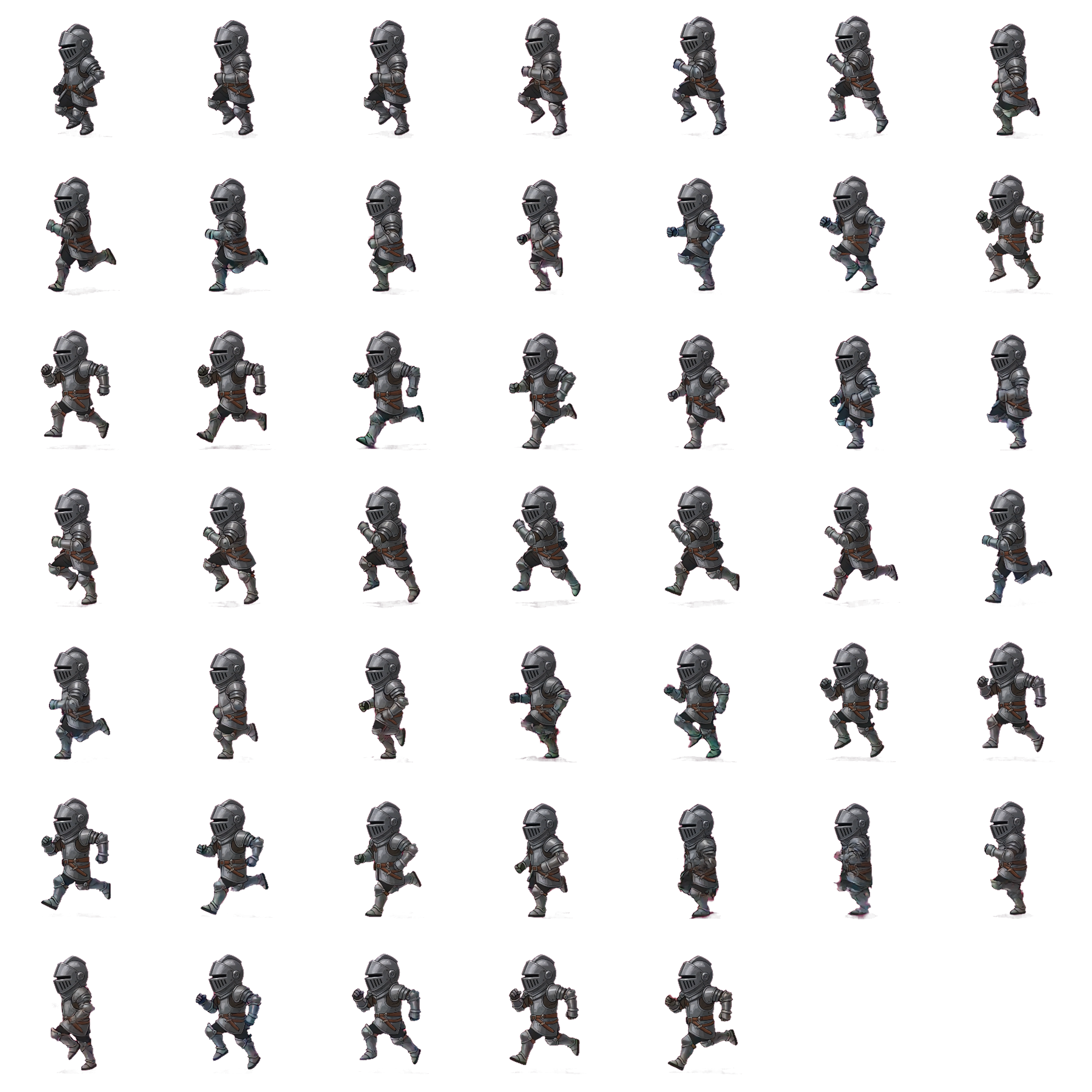
Sprites AI-generated multi-frame character sprite sheet
One reference → a full animation sheet
Sound
Music Prompt + lyrics →
downloadable .mp3 song
Stems Any song →
vocals, drums, bass & more
Video Prompt or image →
animated .mp4 clip

What's in the suite

41 tools, every step of asset creation covered.

Concept and 2D art, image restyling and editing, multi-frame sprite sheets, on-demand sound effects, full lyrical songs, stem separation, text-to-video clips and image-to-3D models — each tool ships as a polished dashboard with real-time previews, one-click downloads and a shared gallery that remembers every asset you've ever made.

Art & Sprites

17 tools
Art & Sprites
Live

Image Generator

Generate images from a text prompt. Choose your aspect ratio and quality — up to Pro, our best image model — run it, download the result. Credits debit on submit and auto-refund on failure.

Art & Sprites
Live

Spritesheet Generator

Animate a single character image into a short clip, then auto-slice it into a transparent, multi-frame sprite sheet. Pick walk, idle, attack, jump or run.

Art & Sprites
New

Restyle & Edit Image

Upload any image, then restyle or edit it with a prompt — change the art style (claymation, watercolour, pixel art…), add or remove objects, or tweak details. Optional transparent background for game-ready sprites. Powered by AnnoMotion AI.

Art & Sprites
New

Icon & Item Set Generator

Generate a set of matching, transparent-background game icons from one prompt — potions, weapons, resources, spells. Pick a style and how many icons; each comes back cut out and ready to drop into your UI. Powered by AnnoMotion AI.

Art & Sprites
New

UI / HUD Kit Generator

Generate a matching set of UI pieces — buttons, panels, bars, frames — with transparent backgrounds, ready to drop into your game HUD. Pick a style and how many pieces. Powered by AnnoMotion AI.

Art & Sprites
New

Parallax Background Layers

Generate a scene as separate scrolling depth layers — sky, midground, foreground — with the front layers cut out on transparency, ready for a parallax background. Powered by AnnoMotion AI.

Art & Sprites
New

Tileset Generator

Generate a seamless, edge-to-edge tileable texture from a prompt and check it against a live repeating preview at 64, 128 or 256 px — perfect for terrain, floors and walls. Powered by AnnoMotion AI.

Art & Sprites
New

VFX / Particle Sprite Sheets

Render a game visual effect — explosions, smoke, magic, sparks — animate it through its full cycle, then bake every frame into one transparent sprite sheet plus a PNG sequence, ready for your particle/VFX system. Powered by AnnoMotion AI.

Art & Sprites
New

VFX Particle Lab

Build an explosion, smoke plume or magic effect from stacked particle emitters right in your browser, using the free built-in decals or your own AI-generated ones, then bake the result to a transparent sprite sheet or a PNG sequence. Powered by AnnoMotion AI.

Art & Sprites
New

Bitmap Font Generator

Generate a styled 36-glyph sheet (A–Z and 0–9) from a prompt and pack it into a bitmap-font atlas with a JSON glyph map in your browser — drop-in pixel fonts for your UI. Powered by AnnoMotion AI.

Art & Sprites
New

Terrain / Trim-Sheet Textures

Generate a seamless terrain or trim-sheet texture, then extract up to five PBR maps from it — albedo, normal, roughness, metalness and height — ready to drop into a 3D material. Powered by AnnoMotion AI.

Art & Sprites
New

Vector Art

Turn a prompt into a true vector illustration — real paths and shapes, not a picture of them. Infinitely scalable, transparent by default, and editable in any vector tool. Pick a style and an aspect, then download the .svg. Powered by AnnoMotion AI.

Art & Sprites
New

Vectorize Image

Upload a PNG, JPG or WEBP and get it redrawn as clean vector paths. Rescue a low-res logo, make a raster icon sharp at any size, or turn a generated image into an editable .svg. Powered by AnnoMotion AI.

Art & Sprites
New

Sprite Sheet Toolkit

Slice a sprite sheet into frames, pack frames into a sheet, turn a GIF or a video clip into a sheet, or turn a sheet back into a GIF — all in your browser. Name your animation clips and download the engine files to go with the sheet: a JSON atlas for Phaser and PixiJS (Aseprite's format), a JSON file of sprite rects and pivots for Unity (a reference — Unity does not import it by itself), a Godot 4 SpriteFrames .tres, GameMaker strips, a CSS sprite stylesheet and a manifest. Your files are never uploaded; free, no credits.

Art & Sprites
New

Pixel Art Converter

Free pixel art converter that turns a photo or drawing into a real game sprite in your browser — pick the size, use your own palette and keep it transparent. Pixelate a picture to the size you choose, keeping its shape or as a square; limit the colours or lock a palette; remove a flat background; and find the pixel grid in enlarged pixel art to snap it back to its real size — it often works on AI pixel art too. Download a true 1:1 PNG and an enlarged copy. Your image is never uploaded; free, no credits.

Art & Sprites
New

Game Icon & Store Asset Kit

Free game icon resizer in your browser that turns one picture into a favicon.ico, iOS and Android app icons, or any size you type. Crop to cover around a focal point or pad to contain, scale smoothly or as pixel art, and download single files or a zip. It also previews Steam capsules, itch.io covers, the Google Play feature graphic and Android adaptive icon layers, which download with a free account. Your picture is never uploaded; no credits.

Art & Sprites
New

Background Remover

Free background remover in your browser that makes a flat or solid-colour backdrop transparent, for sprites, icons and product shots. Auto-detect the colour or click to pick it, set the tolerance, keep soft edges, defringe the colour spill and trim to content, then download a transparent PNG. Batch-remove several images at once into one zip. Your image is never uploaded; no credits.

3D & Animation

9 tools
3D & Animation
New

Image to 3D

Upload a photo — plus a few optional extra angles of the same subject — and turn it into a game-ready 3D model, made inside AnnoMotion Skeleton so you can rig it, animate it and export it for Unity, Godot or Unreal in the same place. Pick your detail level, or switch to the Maximum engine for its highest-detail meshes and low-poly or smart-topology styles. Powered by AnnoMotion AI.

3D & Animation
New

Text to 3D

Describe your asset in a sentence and turn it into a game-ready 3D model — no reference image needed. It is made inside AnnoMotion Skeleton, so you can rig it, animate it and export it for Unity, Godot or Unreal in the same place. Start with an untextured preview or go straight to a full textured model with your own polygon budget, and auto-rig a humanoid character so it arrives with a walk and a run, plus one ready-made animation if you want it. Powered by AnnoMotion AI.

3D & Animation
New

Rig Lab

Load a T-pose or A-pose humanoid GLB and rig it right in your browser — it fits a skeleton to the mesh for you, you drag the joint markers to refine it, then it paints skin weights and previews idle / walk / run / wave before exporting a rigged GLB for Unity, Godot or Unreal. Runs client-side; free, no credits.

3D & Animation
New

3D → Sprite Renderer

Turn a 3D model into a 2D sprite sheet — photographed from 4 or 8 directions around the model, at your chosen frame size, with an optional isometric pitch and transparent background. Runs client-side; free, no credits.

3D & Animation
New

Auto-LOD / Mesh Optimizer

Shrink a model's triangle count for fast, game-ready LODs — pick a reduction level, preview the simplified mesh, compare original vs reduced triangles and export a lighter GLB. Runs client-side; free, no credits.

3D & Animation
New

Text to Motion

Describe a movement — a walk cycle, a jump, a wave — and get a skeletal animation you can drop onto your character. Exports an animation file ready for your engine or DCC. Powered by AnnoMotion AI.

3D & Animation
New

3D Re-texture

Give one of your 3D models a whole new look from a text prompt — re-skin the same mesh in a different material or style, then download the re-textured model. Powered by AnnoMotion AI.

3D & Animation
New

Split Model

Cut one of your 3D models into separate parts you can pose, swap or print — a humanoid template that splits a character into limbs with real joints, or an automatic split for any other mesh. Powered by AnnoMotion AI.

3D & Animation
New

AnnoMotion Skeleton

Make, rig and animate 3D models in one place. Create a model from a description or from photos, take the plain humanoid body Skeleton builds for you, or open a 3D model you have already made — then fit a skeleton to it in your browser, animate it on a timeline and export a rigged, animated glTF with engine presets for Unity, Unreal and Godot, or render it out as a 2D sprite sheet. The editor runs client-side and is free; the optional AI auto-rig (people, animals, birds, dragons or a skeleton you describe, with ready-made animations) and generating a model from a description or photos spend credits, and the motion preset library — walk, run, jump, pick up, attack — is free to use.

Audio & Voice

6 tools
Audio & Voice
Live

Sound Effect Generator

Type a description, get a downloadable sound effect from one to thirty seconds long — MP3, WAV, FLAC or AAC. Make up to four variations of a sound, or a whole batch from a list of prompts at once.

Audio & Voice
Live

Music Generator

Type a style prompt, add your own lyrics or let it write them, get a downloadable .mp3 song. Vocal or instrumental — perfect for menu themes, level music, boss anthems and ambient loops.

Audio & Voice
New

Seamless Music Loops

Generate a music track from a prompt, then set loop points and export a seamless, gapless loop right in your browser — perfect for menus, levels and ambient beds. Powered by AnnoMotion AI.

Audio & Voice
New

Foley / Footstep Packs

Generate a burst of a repeating sound — footsteps, impacts, clicks — as one clip, then slice it into individual variation files in your browser for natural, non-repetitive game audio. Powered by AnnoMotion AI.

Audio & Voice
New

Stem Separation

Split a generated song or uploaded audio into separate stems — vocals, drums, bass, guitar, piano and other — each as a downloadable .mp3. Great for remixing, karaoke, sampling and game-audio reuse.

Audio & Voice
New

Voice & Dialogue

Turn written lines into natural spoken voice-over — narration, NPC dialogue, menu prompts. Pick a voice, paste your text and download the .mp3. Powered by AnnoMotion AI.

Video & Cutscenes

2 tools
Video & Cutscenes
New

Video Generator

Generate a short video clip from a text prompt. Pick a 5 or 10 second clip, add audio if you want it, and download the .mp4. Powered by AnnoMotion AI.

Video & Cutscenes
New

Cutscene Stitcher

Stitch your generated video clips into one longer cutscene — pick the clips, set the order, and export a single video, all in your browser. Free, no credits, and saved straight to your gallery.

Writing & Design

6 tools
Writing & Design
New

Lore & Narrative Writer

Generate world lore, quests, branching NPC dialogue trees and item descriptions from a short brief. Pick a type and tone, then copy or download the result. Powered by AnnoMotion AI.

Writing & Design
New

Localization

Translate a block of your game strings into another language in one go — keys and placeholders like {player} or %d are preserved untouched, ready to paste back into your project. Powered by AnnoMotion AI.

Writing & Design
New

Game Design Writer

Generate themed name lists (characters, places, items), item & character stat blocks, or a game-design-document section from a short brief. Copy or download the result. Powered by AnnoMotion AI.

Writing & Design
Beta

HTML5 Game Prototype

Describe a game and get a single, self-contained HTML5 build you can play right away — arcade, puzzle, platformer and more. Preview it in the browser, then download the .html to run or edit anywhere. Powered by AnnoMotion AI.

Writing & Design
New

AnnoMotion Lattice

Describe a web app or browser game and get a working, multi-file build — every file a node on a canvas you can read, edit and regenerate one at a time, then run full screen. Powered by AnnoMotion AI.

Writing & Design
Beta

SVG Logo & Icon

Turn a short brief into a crisp, scalable SVG logo, icon or flat asset — infinitely resizable and ready to drop into your game or brand. Preview it, then download the .svg. Powered by AnnoMotion AI.

Utilities & Workflow

1 tool
Utilities & Workflow
New

AnnoMotion Forge

Chain the AI tools together on a node canvas — wire a prompt into an image, add finishing steps, out to your gallery. Build it once, run it whenever.

New · AnnoMotion Forge

Chain these tools into one automated pipeline.

AnnoMotion Forge is a visual node canvas that wires most of the generators above together — prompt → image → sprites — plus finishing steps like background removal and upscaling, then exports an engine-ready asset pack. Build the pipeline once, run it whenever. Same shared credits, no code.

Explore Forge

Why a suite

One workspace replaces your whole stack of AI subscriptions.

Building a game means juggling concept art, geometry, animation, audio and a soundtrack. Stitching together a stack of separate AI services means a login, a billing cycle and an export pipeline for every one — and credits you can't share across tools. Here you get one.

One shared credit balance

Same credits pay for every tool. Top up once, spend it anywhere — image, sprites, sound. No tool-specific wallets, no expiring buckets.

One gallery for everything

Every image, sheet, song and sound effect you generate lives in one searchable gallery. Star the keepers, delete the misses, re-download any artifact any time.

Free to try, a plan to ship

Every generator is open on the free tier. A plan adds a monthly credit allowance at the lowest per-credit rate, with allowance that rolls over unused. One-off credit packs are open to everyone, no subscription needed: £4.99 for 400 credits, £11.99 for 1,000 credits, £29.99 for 2,700 credits. Bought and plan credits never expire (only the free daily credits reset each day).

Auto-refund on failure

Every tool debits credits on submit and refunds automatically if the provider job fails or times out.

Engine-ready exports

PNG, SVG, GLB, MP3, WAV and MP4 — open standards only, no proprietary container and no plugin to install. Packed sheets also ship Phaser, Godot and Unity atlas sidecars. No vendor lock-in.

Most jobs survive the tab

The generators submit to the provider and write the result to your gallery whether or not you are watching. If a job lands after you have closed the tab, the rescuer that finishes it emails you a summary of what it recovered — twenty of the tools now, not the four that used to mail, to confirmed addresses, and capped at a few messages a day rather than one per file. The four browser-side tools — Rig Lab, 3D to Sprite, Auto-LOD and the Cutscene Stitcher — are the exception: they compute on your machine, so their work goes with the tab.

Free ✨ Polish on every prompt box

Every AI tool's prompt box — and the prompt nodes in Forge — has a ✨ Polish button that turns a casual sentence into the fuller prompt the model actually wants. The rewrite appears in the box with an Undo, so you see exactly what will be sent, and it never costs credits. Localisation source text and negative prompts are left as you wrote them. The Image Generator can also expand your prompt automatically (on by default), and the Spritesheet Generator tidies your motion phrase.

10 free credits to try

Verify your email and your new account gets 10 credits — enough to put the everyday tools through a real job before you reach for a payment method. When your first AI creation finishes, 30 bonus credits land in your balance. The heavy jobs at full quality — video, 3D and re-texturing — draw more than the bonus covers.

How a game-asset session goes

Idea to playable in an afternoon.

The suite is designed for a real indie workflow. Here's how a typical session plays out from sentence to shippable build.

01 — Concept

Generate the look

Hit the Image Generator. Describe the world, the character, the prop. Get a high-res PNG. Iterate until you have the keyframe you want. Star it.

02 — Animation

One frame → full sheet

For 2D characters, drop the keyframe into the Spritesheet Generator. Pick walk, run, attack or idle. Get a grid PNG. Slice it in your engine.

03 — Audio

Type the sound, hear it back

Describe pickups, hits, ambiences, menu beds. The Sound Effect Generator returns MP3, WAV, FLAC or AAC files from one second to thirty — one take, several variations, or a whole batch of prompts at once.

04 — Ship

Drop into your engine

PNG, MP3 and MP4 are the lingua franca of every modern game engine. Drop the assets straight into Unity, Godot, Unreal or the ArcadeOn Engine and keep building.

05 — Iterate

Everything stays in your gallery

Every asset you made is in your shared gallery. Star the keepers, delete the misses, re-download anything with one click. No "where did I save that?" moments.

FAQ

Questions other indie devs asked.

Can I use the assets commercially?

Yes. Anything you generate is yours to ship — in commercial games, client work, marketing, print, the lot — subject to applicable law and our AI provider's policies, with or without a plan. We don't claim ownership of outputs and we don't watermark exports.

Which game engines does this work with?

Anything that reads PNG, SVG, GLB, MP3, WAV and MP4 — open standards, with no proprietary container and no plugin to install. Three engines get a little more than that: pack a sprite atlas and you also get a Phaser JSON, a Godot .tres and a Unity .meta alongside the sheet, so the frames come in already cut. Beyond those import files we publish formats rather than engine integrations — there is no per-engine certification behind this page, and the honest claim is that the files are standard rather than that every engine on a list has been through a test pass here.

Do credits expire? Is there a subscription?

Credits you are given or buy never expire — only the free daily credits do, at midnight UTC — and every generator is open on the free tier. What a plan adds is a monthly credit allowance at the lowest per-credit rate, with allowance that rolls over unused. One-off credit packs are open to everyone, no subscription needed: £4.99 for 400 credits, £11.99 for 1,000 credits, £29.99 for 2,700 credits. AnnoMotion Animate, the browser animation and video editor, sits outside all of this: it is free, and animating, editing and exporting never spend a credit. Its optional AI tools are charged: Restyle with AI (the AI re-render) and Generate video, per second of clip; Live Director, per second of live session, which also needs the Studio membership; and the AI part-cutter, which splits one character image into separate limb layers.

What happens if a job fails?

You get the credits back automatically. We debit credits on submit so the UI can show a real balance, then auto-refund if the provider job errors or times out. A run that completes is charged in full even when it comes back with less than the maximum, though — the Terrain tool asks the extractor for five PBR maps and bills the same whether five come back or one. If none of the maps come back, you keep the base texture and we credit the map portion back.

How long does each tool take to run?

It varies with the provider and the load, and we don't publish per-tool timings because nothing on this page measures them — the latency we do record is an internal figure that mixes our own queue wait with the provider's processing time, which is not a number to quote at you. What is fixed is the point at which a tool gives up: each one carries its own poll ceiling — six minutes on Text to Motion, eight on Re-texture — and hitting it refunds you rather than leaving the job hanging.

Can I close the tab while a job runs?

For most of the generators, yes — the job is submitted to the provider and the result is written to your gallery whether or not you are watching, and a background rescuer finishes ones that were left mid-flight. Six tools cannot, because they do the work on your machine rather than ours: Rig Lab, 3D to Sprite, Auto-LOD, the Cutscene Stitcher, the Sprite Sheet Toolkit and the Pixel Art Converter all lose their work if the tab goes. The writing and design tools answer inside a single request, so closing that request loses the result too. And six server jobs — the Spritesheet Generator, Terrain, the Stem Separator, Restyle, Re-texture and Text to Motion — are refunded rather than resumed if you leave before they land, because there is no server-side path that could finish them for you.

Is there an API?

Yes, though it is small and undocumented. A token-authenticated JSON API ships today: register or log in for a token, then generate an image, list and poll your image jobs, download a variant, delete a job and read your gallery. That is the whole surface — every other tool is dashboard-only, there is no published reference, and nothing about it is contract yet, so treat it as unsupported and expect it to change.

How does this compare to running models myself?

If you already have your own self-hosted generation pipeline and a GPU rig, run yours. The suite is for everyone else — pay per asset, no infra, no provider juggling, a polished UI and one shared gallery. You also get free prompt help: every tool's prompt box has a ✨ Polish button that rewrites a short idea into a fuller prompt, shows you the rewrite with an Undo, and never costs credits. It leaves localisation source text and negative prompts alone. The Image Generator can also expand your prompt automatically (a toggle, on by default), and the Spritesheet Generator tidies your motion phrase before it goes out.

Where are my generations stored?

On our servers, tied to your account. Most media — images, sheets, audio, video, 3D — is served through a signed URL that expires about a day after it is issued, so a copied link does stop working eventually, but it is a shareable link until then rather than a private one. Forge and Animate uploads use a six-hour signature. The writing and design tools keep their result as text in the database and serve it from a route that checks you own it instead of signing it, and the API serves artifacts against your token. You can re-download any past asset from the gallery any time, or delete it permanently with one click.

Who's behind this?

AnnoMotion is made by ArcadeOn Studios, an independent UK studio. We build SaaS and downloadable creator tools, and this AI suite is the asset-creation side of the studio. See the full portfolio.

Stop wiring a stack of AI services together.

One workspace. One credit balance. Image, sprites, sound and music — all on the same login, all in your gallery, all engine-ready. Verify your email for 10 free credits, no card required.

Start free · 10 credits Sign in Continue with Google