
One character image.
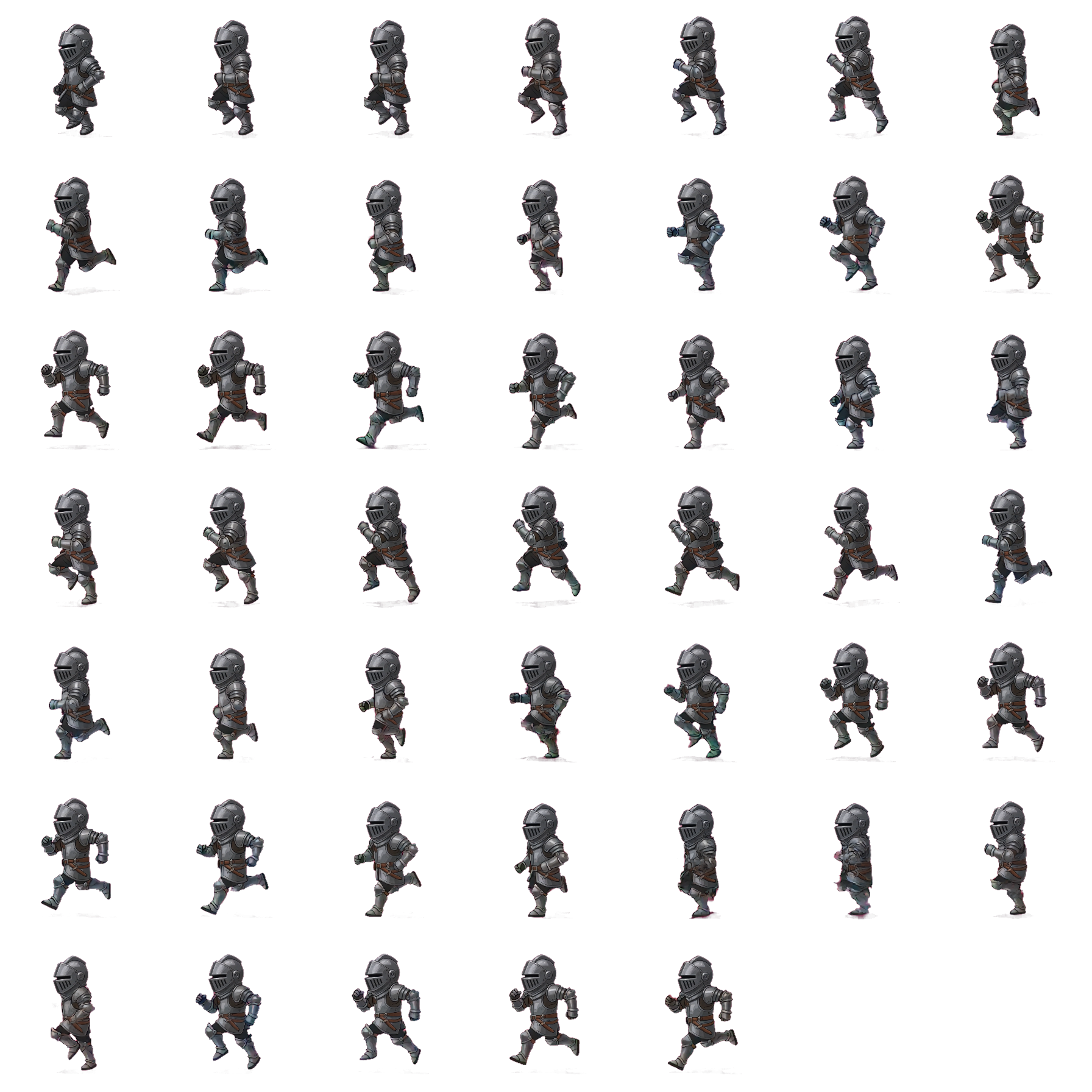
A full sprite sheet back.
Upload a reference character. Pick an animation — walk, idle, attack, jump or run. AnnoMotion AI brings it to life as a short clip, then your browser auto-extracts the frames, keys out the backdrop, and packs them into a single transparent grid PNG — or a clean PNG sequence. Engine-ready, every time.

What's inside
From a still character to a playable cycle.
Sprite sheets live or die on smooth, consistent motion. AnnoMotion AI animates your character first, then we slice that motion into clean, evenly-spaced frames.
Motion presets
Walk, idle, attack, jump or run — each preset tells AnnoMotion AI exactly how to animate your character, or write your own motion prompt.
Frames packed into a grid
Your browser samples evenly-spaced moments from the generated clip and packs them into a tidy grid, with the columns, rows and frame size recorded alongside it so your slicer knows how to cut it.
Transparent by design
Your character is animated on a flat backdrop colour, then your browser keys that colour out — so every frame lands with a clean alpha edge.
Engine-ready grid PNG
The output is a single transparent grid PNG with the layout baked in — drop it straight into Unity, Godot, Unreal, Aseprite or your own slicer.
PNG sequence too
Prefer individual frames? Grab the whole animation as a numbered PNG sequence in a single .zip — built right in your browser.
Favourites & gallery
Pin the keepers. Re-download the sheet any time. Your whole history lives in your account — no losing yesterday's cycle.
How it works
Three steps.
Upload your character
Full-body view, clean background. PNG/JPG/WebP up to 5 MB. The clearer the silhouette, the better the cycle.
Pick a motion
Choose a preset — walk, idle, attack, jump, run — or write your own in up to 200 characters. Then pick a five or ten second clip for the frames to be sampled from.
Get your sheet
AnnoMotion AI renders a short clip, then your browser extracts the frames, removes the backdrop and packs a transparent grid PNG — or a PNG sequence.
FAQ
Sprite sheets, answered.
What kind of reference image should I upload?
A single full-body view of your character on a clean background — PNG, JPG or WebP, up to 5 MB. The clearer and less cluttered the silhouette, the better the cycle, because the whole pipeline keys the backdrop away from that shape.
Which animations can I generate?
Five presets — walk, idle, run, attack and jump — or a custom motion you describe yourself in up to 200 characters. The presets exist because they are the cycles most games need first; the custom option is there for everything else, like a cast, a hit reaction or a crouch.
How long is the clip the frames come from?
You choose either a five or a ten second clip before you generate. That is the run of motion your frames are sampled from, so a longer clip gives the animation more room to breathe and costs more credits than a short one.
Does my character image get processed on your servers?
The clip is rendered on our side, but the sheet is not. Frame extraction, keying out the backdrop and packing the grid all happen in your own browser, on your own machine — your browser then uploads the finished sheet. That is also why the assembly step costs no extra credits.
What do I actually get to download?
A single transparent grid PNG with the layout baked in — the columns, rows and frame size are recorded with it, so Unity, Godot, Unreal, Aseprite or your own slicer can cut it up. If you would rather have loose frames, your browser can also build a numbered PNG sequence as one .zip without going back to the server.
Skip the frame-by-frame grind.
Ship a working animation in the time it'd take to redraw frame two by hand.