
Sheets in, frames out.
And back again.
Drop in a sheet to slice it into frames, or drop a folder of frames to pack them into a sheet — then press Space and watch the animation play beside the sheet it came from. One window, no upload, no subscription, and it opens in about a second.
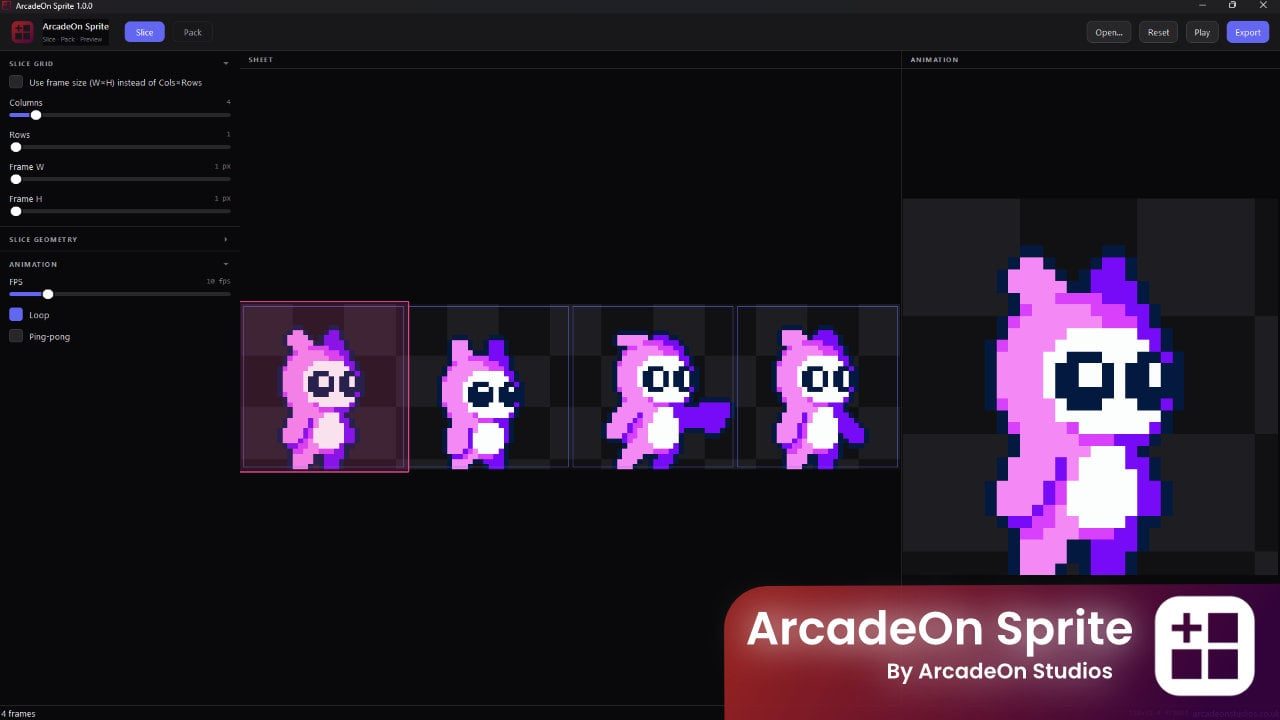
ArcadeOn Sprite 1.0.0 — a native Windows application we publish under the ArcadeOn Studios name.
Get it
Two editions of ArcadeOn Sprite.
We sell ArcadeOn Sprite on our ArcadeOn Studios storefront — not through an account here, and not on credits. Both links below leave this site.
Free edition
A free download of ArcadeOn Sprite, listed alongside the paid one. The storefront publishes no comparison between the two, so start here and see whether it does what you need.
Download free — ArcadeOn Sprite Free edition (opens in a new tab)Paid edition
A one-off purchase, not a subscription, and no account on this site. The storefront prices in US dollars and shows the equivalent in your own currency — a UK visitor sees about £6.66.
Buy $8.99 — ArcadeOn Sprite Paid edition (opens in a new tab)What's inside
What ArcadeOn Sprite does, and how it does it.
Slice a sheet into frames
Cut by columns and rows, or by exact frame width and height. Margin, spacing and a maximum frame count are all yours to set, empty cells are skipped automatically, and each frame can be auto-trimmed to its own non-transparent bounding box.
Pack frames into a sheet
Lay frames out as a grid, a horizontal strip or a vertical strip, with the column count on auto or set by hand. Padding, margin and five alignment modes decide the spacing, and an optional power-of-two sheet size keeps GPU textures happy.
Watch it play, right there
The sheet sits on one side and the animation plays on the other, from 1 to 60 frames per second, looping or ping-ponging. The frame currently on screen is highlighted on the sheet as it plays, and Space starts and stops it.
Export into your pipeline
Individual PNG frames, an animated GIF or WebP, or a repacked sheet with JSON metadata alongside it. Frames of different sizes are normalised automatically, so the animated output does not jump around as it plays.
Backgrounds for keying
Pack onto transparent, black, white or magenta. The magenta option is there for the pipelines that still key a colour out rather than carry an alpha channel, and transparent is there for the ones that do not.
Drag it in and get on with it
Drop a file and it slices; drop a folder and it packs. Filenames sort the way a human reads them, so frame 2 comes before frame 10, there are keyboard shortcuts throughout, and your settings are still there the next time you open it.
Specifications
The details, plainly.
- Slice output
- Individual PNG frames
- Pack output
- Sprite sheet PNG, with JSON metadata alongside it
- Animation
- Animated GIF or WebP; live preview at 1–60 frames per second
- Layouts
- Grid, horizontal strip or vertical strip, with an optional power-of-two sheet size
- Platform
- Windows — a single signed .exe
- Startup
- Under a second
- Frame order
- Natural filename sorting, so frame 2 comes before frame 10
FAQ
ArcadeOn Sprite, answered.
Can it cut a sheet whose frames are not a neat grid?
Up to a point. You can slice by columns and rows or by an exact frame width and height, and set the margin and spacing around the cells, which covers most sheets that were packed by a tool. Empty cells are skipped rather than exported as blank frames, and each frame can be trimmed to its own non-transparent bounds afterwards.
What do I get when I pack a sheet?
A sprite sheet PNG with JSON metadata alongside it. You choose the layout — grid, horizontal strip or vertical strip — the padding and margin, one of five alignment modes, and whether to round the sheet up to a power-of-two size for GPU textures.
Can I get an animated GIF out of it?
Yes — animated GIF or WebP, as well as individual PNG frames and the repacked sheet. If the frames you fed it are different sizes they are normalised first, so the exported animation does not jitter as it plays.
Does it upload my sprites anywhere?
No. It is a desktop application that ships as a single signed .exe, and the listing is explicit that there is no web upload, no subscription and no cloud — your art stays on your machine.
Is the free ArcadeOn Sprite different from the paid one?
If it is, the storefront does not say so: both listings carry the same description and the same screenshots. So rather than describe a difference nobody has published, the suggestion is the obvious one — take the free download, and buy the paid edition if you find you want it.
How does this relate to the AnnoMotion sprite sheet generator?
They sit at opposite ends of the same job. The AI generator on this site makes a sheet for you from a character reference, in the browser and on credits. ArcadeOn Sprite takes sheets and frames you already have and slices, repacks and previews them on your own machine. Generating a sheet here and re-cutting it there is a perfectly normal round trip.
Start with the free ArcadeOn Sprite.
It costs nothing and it runs on your own machine. Buy the paid edition afterwards only if you decide you want to.